Tunedeck
Open the Tunedeck from Now Playing (or View → Tunedeck). It docks from the right and pushes the rest of the app aside rather than covering it, so you can keep browsing with it open.
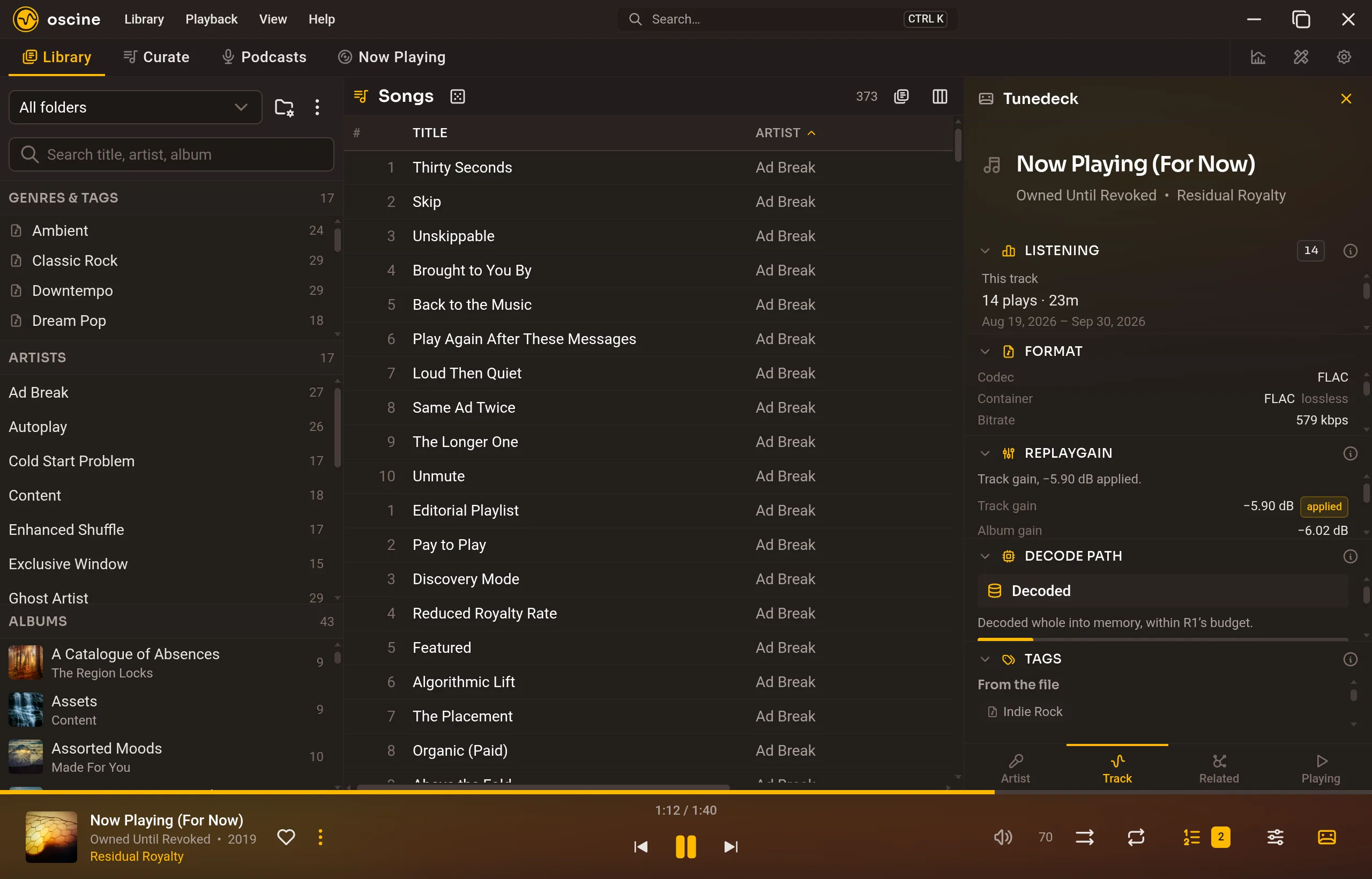
It has four tabs, one per question: who made this, what this file is, what else is like it, and what is happening.
Artist
Who you are hearing. A biography from Wikipedia, the lineup and related artists from MusicBrainz shown where they match your library, links out to the web, the albums by this artist you actually own, your favorite songs by them, and your listening totals. If the header names the wrong artist, correct it there and Oscine remembers.
The biography, the lineup, and the web links need online lookups turned on. The library panes — what you own, your favorites, your totals, your tags — work whether or not they are.
Track
Listening totals for the song and the album, the file's format, the ReplayGain being applied right now, and whether the track was decoded into memory or streamed past the size cap. Your tags for it sit at the bottom.
Related
The rest of this album first, then looser connections: shared genre, year, or folder. Double-click to queue. Nothing here interrupts what is already playing.
Playing
Up next is the queue. Drag to reorder, double-click to jump. Clear removes what you queued by hand, not the session behind it.
Trail is the last several hundred plays, skips included. Double-click to hear something again; playback returns to where it was.