Tools: editing tags
Fixing a tag in Oscine changes nothing on disk. Right-click a track, choose Edit metadata…, and your correction updates Oscine's own copy — an override — while the file stays exactly as it was. Edits gather until you decide to commit them. That decision lives in the Tools tab.
Every field, not just the basics
The editor opens on the fields you'll reach for most: title, artist, album artist, album, track and disc numbers, year, and genre. As of 1.1, open All fields below them for just about everything else a file can carry:
- Credits: composers, conductor, and remixer
- Numbering: track and disc totals
- Release: subtitle, grouping, publisher, copyright, ISRC, and the compilation flag
- Content: comment, description, lyrics, BPM, and initial key
- Sorting: sort names for the title, artist, album artist, album, and composer
- Advanced: MusicBrainz IDs, plus release status, type, and country
ReplayGain values are shown too, but they're read-only. Setting an album artist is also how you pull a compilation that's split across several "albums" back into one. The same fields show up in Track Info, so you can see everything a file holds without opening the editor.
Staged, then reviewed
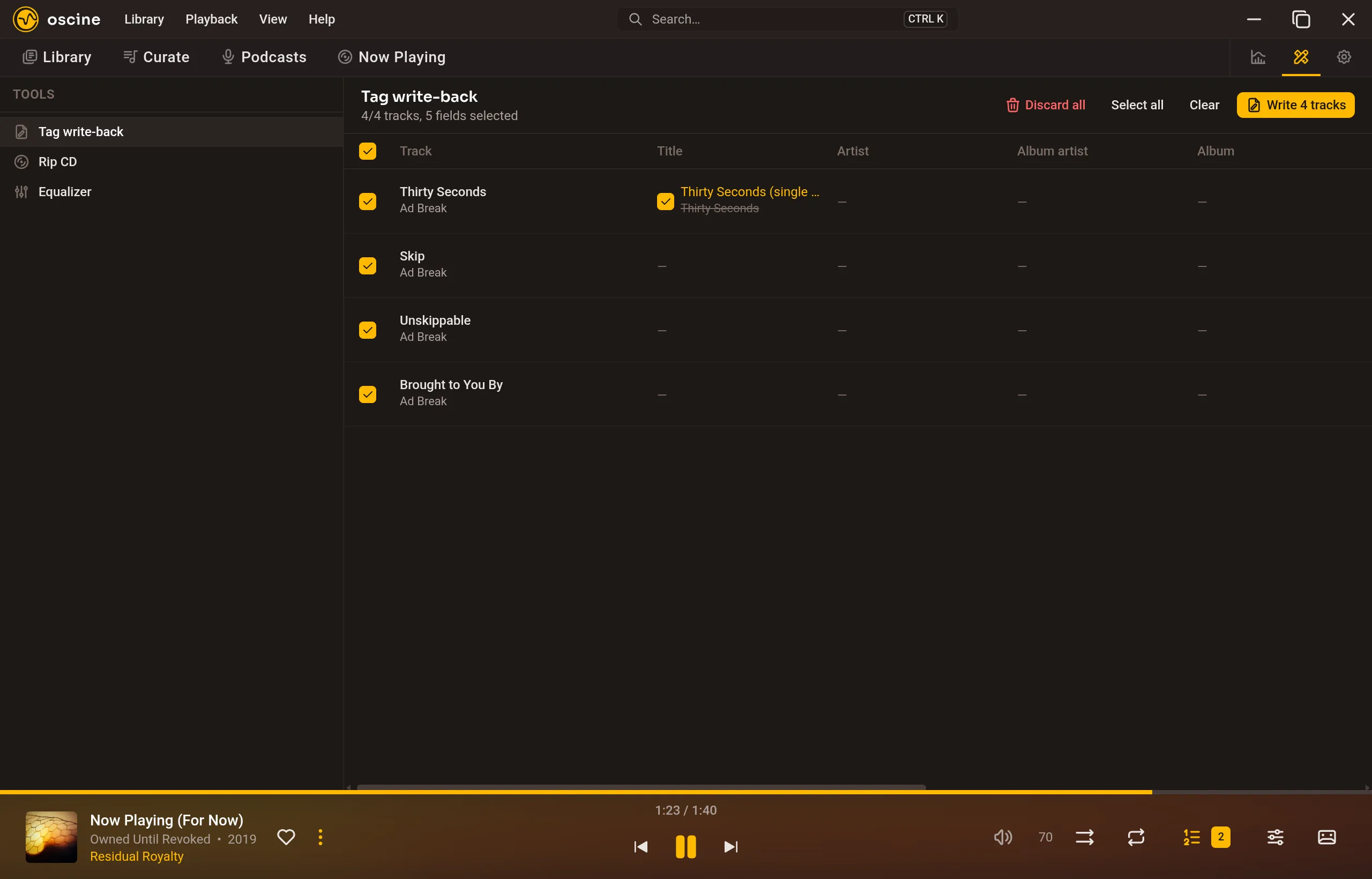
Every unwritten correction collects in Tools → Tag write-back. It's a table, one row per track and a column for each field you've changed, with the old value struck through and the new value beside it. Nothing here has touched your files yet.
You choose what actually gets written. Tick a whole row, or a single field within it — Select all, Clear, and per-cell checkboxes all work — and the header keeps a running count of tracks and fields selected. Discard all throws the pending edits away (it asks first). When you're ready, Write commits only what you've ticked.
Writing back
Oscine writes each file in the tag format its container actually uses: ID3v2 for MP3, Xiph (Vorbis) comments for FLAC, Ogg, and Opus, and iTunes/MP4 atoms for AAC (.m4a). Genres go into a single field so they read back as the same set. Anything outside those formats — a .wav, a .wma — is refused before the file is even opened, so a format Oscine can't round-trip is never put at risk.
Files are written one at a time, with a live count, and you can cancel partway through. Each row ends with a result: Written, Skipped (the file already held that value), or a typed failure — Unsupported, Write failed, Verify failed. One file failing never stops the rest of the batch; the summary tallies what was written, skipped, and failed.
Backup and rollback
No file is edited in place. For each track Oscine copies the original alongside it, applies the tags to the copy, and flushes it to disk. Only then does it move the original aside as a backup and swap the new file into its place — an atomic rename, so there's never a half-written file. It re-reads what it just wrote and verifies the tags came back exactly as intended, checking replaced cover art by its hash. If anything fails to match, it rolls the backup straight back over the write, leaving the file byte-for-byte what it was before. When the write verifies clean, the backup is dropped.
What never happens on its own
Oscine never writes a tag to disk on its own — the only path from an edit to your files is the write you confirm. It never touches the audio, only the tag region. It never renames or moves your files. And it leaves alone everything you didn't change: ReplayGain, any custom tags it doesn't know about, and every embedded image except the front cover all survive a write untouched.